
🪁 Microservices Architecture Style
In Microservices Architecture, the application is broken down into small, independent services, each responsible for a specific business capability. Each service can be developed, deployed, and scaled independently.
Table of Contents
- Key Features
- When to Use
- Challenges
- Microservices Architecture Design
- Development Setup
- How to Run
- Documentation Apis
Key Features
- Independent Services: Each service is a separate project with its own database and deployment pipeline, enabling independent development and deployment.
- Decentralized Communication: Services communicate via APIs (REST, gRPC) or message brokers (RabbitMQ, Kafka), ensuring loose coupling and resilience.
- Scalability: Services can be scaled independently based on demand, allowing efficient resource utilization.
- Fault Tolerance: Failures are isolated, preventing cascading failures and ensuring high availability.
- Technology Agnostic: Services can use different technologies, frameworks, or databases, providing flexibility.
When to Use
- Large and Complex Projects: Ideal for applications with complex business logic that can be broken into smaller, manageable services.
- High Scalability Needs: Suitable for applications requiring independent scaling of components.
- Fault Tolerance and High Availability: Perfect for systems where failure isolation and uptime are critical.
- Distributed Teams: Enables teams to work independently on different services.
- Frequent Updates: Supports continuous deployment and A/B testing for individual services.
- Technology Diversity: Allows the use of different technologies for different services.
Challenges
- Increased complexity in management, DevOps overhead, data consistency, latency, and higher costs.
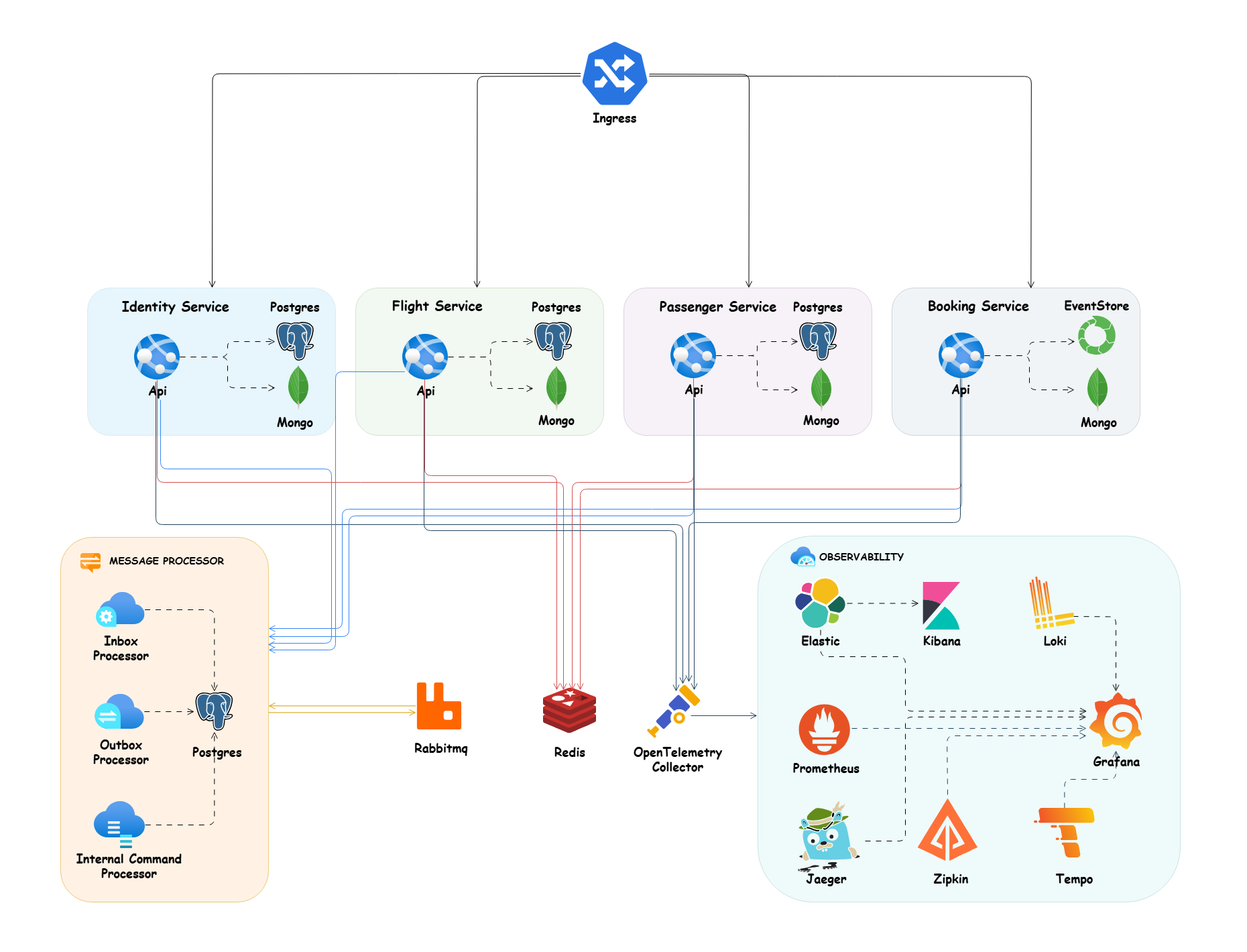
Microservices Architecture Design
Development Setup
Dotnet Tools Packages
For installing our requirement packages with .NET cli tools, we need to install dotnet tool manifest.
dotnet new tool-manifest
And after that we can restore our dotnet tools packages with .NET cli tools from .config folder and dotnet-tools.json file.
dotnet tool restore
Husky
Here we use husky to handel some pre commit rules and we used conventional commits rules and formatting as pre commit rules, here in package.json. of course, we can add more rules for pre commit in future. (find more about husky in the documentation)
We need to install husky package for manage pre commits hooks and also I add two packages @commitlint/cli and @commitlint/config-conventional for handling conventional commits rules in package.json.
Run the command bellow in the root of project to install all npm dependencies related to husky:
npm install
Note: In the root of project we have
.huskyfolder and it hascommit-msgfile for handling conventional commits rules with provide user friendly message andpre-commitfile that we can run ourscriptsas apre-commithooks. that here we callformatscript from package.json for formatting purpose.
Upgrade Nuget Packages
For upgrading our nuget packages to last version, we use the great package dotnet-outdated. Run the command below in the root of project to upgrade all of packages to last version:
dotnet outdated -u
How to Run
Config Certificate
Run the following commands to Config SSL in your system:
Windows using Linux containers
dotnet dev-certs https -ep %USERPROFILE%\.aspnet\https\aspnetapp.pfx -p password
dotnet dev-certs https --trust
Note: for running this command in powershell use $env:USERPROFILE instead of %USERPROFILE%
macOS or Linux
dotnet dev-certs https -ep ${HOME}/.aspnet/https/aspnetapp.pfx -p $CREDENTIAL_PLACEHOLDER$
dotnet dev-certs https --trust
Docker Compose
To run this app in Docker, use the docker-compose.yaml and execute the below command at the root of the application:
docker-compose -f ./deployments/docker-compose/docker-compose.yaml up -d
Kubernetes
To configure TLS in the Kubernetes cluster, we need to install cert-manager based on the docs and run the following commands to apply TLS in our application. Here, we use Let's Encrypt to encrypt our certificate.
kubectl apply -f ./deployments/kubernetes/booking-cert-manager.yml
To apply all necessary deployments, pods, services, ingress, and config maps, please run the following command:
kubectl apply -f ./deployments/kubernetes/booking-microservices.yml
Build
To build all microservices, run this command in the root of the project:
dotnet build
Run
To run each microservice, run this command in the root of the Api folder of each microservice where the csproj file is located:
dotnet run
Test
To test all microservices, run this command in the root of the project:
dotnet test
Documentation Apis
Each microservice provides API documentation and navigate to /swagger for Swagger OpenAPI or /scalar/v1 for Scalar OpenAPI to visit list of endpoints.
As part of API testing, I created the booking.rest file which can be run with the REST Client VSCode plugin.