
🪁 Monolith Architecture Style
In Monolith Architecture, the entire application is built as a single, tightly coupled unit. All components (e.g., Api, business logic, and data access) are part of the same codebase and deployed together.
Table of Contents
- Key Features
- When to Use
- Challenges
- Monolith Architecture Design
- Development Setup
- How to Run
- Documentation Apis
Key Features
- Single Codebase: All components (UI, business logic, data access) are part of one project.
- Tight Coupling: Components are highly dependent on each other, making changes riskier.
- Simple Deployment: The entire application is deployed as a single unit.
- Centralized Database: Typically uses a single database for all data storage and access.
When to Use
- Small to Medium Projects: Ideal for applications with limited complexity and scope.
- Rapid Development: Suitable for projects requiring quick development and deployment.
- Small Teams: Works well for small teams with limited resources.
- Low Scalability Needs: Best for applications with predictable and low traffic.
Challenges
- Harder to maintain as the codebase grows.
- Limited scalability (scaling requires scaling the entire application).
- Difficult to adopt new technologies incrementally.
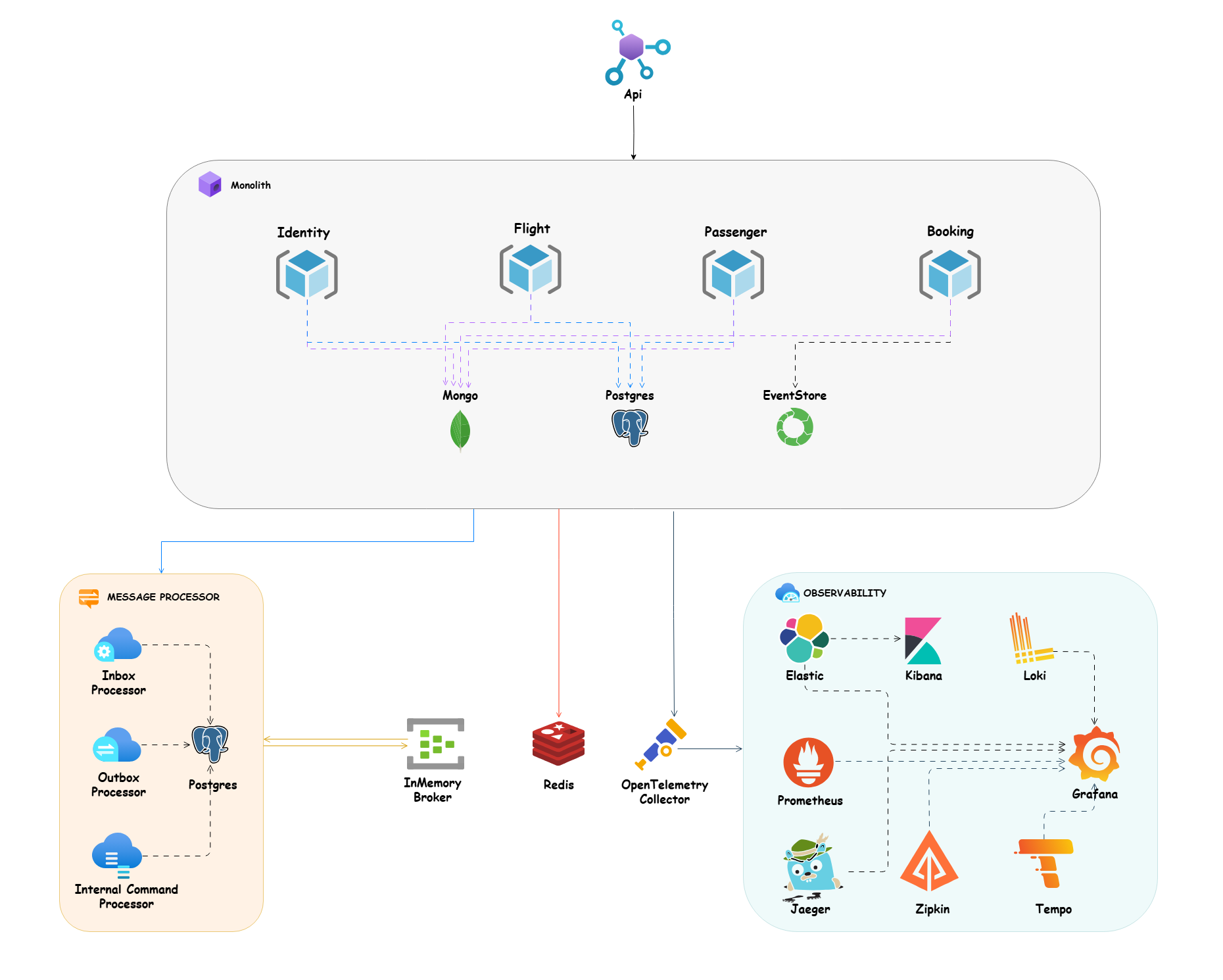
Monolith Architecture Design
Development Setup
Dotnet Tools Packages
For installing our requirement packages with .NET cli tools, we need to install dotnet tool manifest.
dotnet new tool-manifest
And after that we can restore our dotnet tools packages with .NET cli tools from .config folder and dotnet-tools.json file.
dotnet tool restore
Husky
Here we use husky to handel some pre commit rules and we used conventional commits rules and formatting as pre commit rules, here in package.json. of course, we can add more rules for pre commit in future. (find more about husky in the documentation)
We need to install husky package for manage pre commits hooks and also I add two packages @commitlint/cli and @commitlint/config-conventional for handling conventional commits rules in package.json.
Run the command bellow in the root of project to install all npm dependencies related to husky:
npm install
Note: In the root of project we have
.huskyfolder and it hascommit-msgfile for handling conventional commits rules with provide user friendly message andpre-commitfile that we can run ourscriptsas apre-commithooks. that here we callformatscript from package.json for formatting purpose.
Upgrade Nuget Packages
For upgrading our nuget packages to last version, we use the great package dotnet-outdated. Run the command below in the root of project to upgrade all of packages to last version:
dotnet outdated -u
How to Run
Build
To build monolith app, run this command in the root of the project:
dotnet build
Run
To run monolith app, run this command in the root of the Api folder where the csproj file is located:
dotnet run
Test
To test monolith app, run this command in the root of the project:
dotnet test
Documentation Apis
Each microservice provides API documentation and navigate to /swagger for Swagger OpenAPI or /scalar/v1 for Scalar OpenAPI to visit list of endpoints.
As part of API testing, I created the booking.rest file which can be run with the REST Client VSCode plugin.